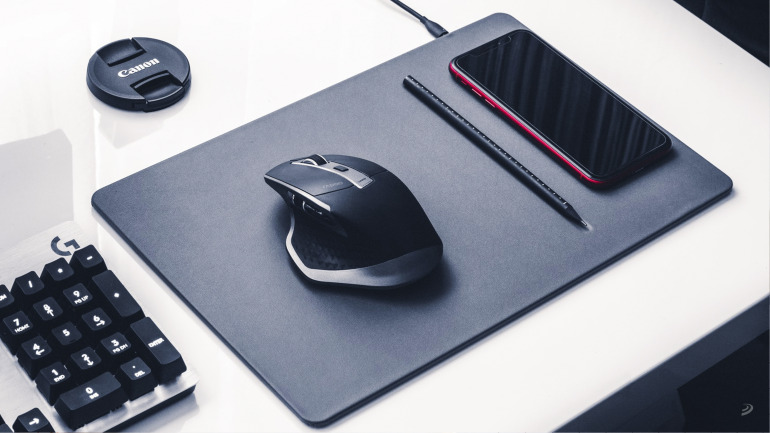
Treat your peripheral right, and your peripheral will treat you right back, both for gaming and for work.
For some of us, the putting a mouse pad in place is a basic thing to do.For some people it’s not, but for others it’s not, even though there are several reasons – and compelling ones – why you should; not just to make your peripheral work better.but also to make it last longer, as well as the surface itself on which you use it. Then there would be the conversation of whether it’s more comfortable to have a mat the size of your entire table, of course, or of what material you may be most interested in.
We don’t want to beat around the bush, so let’s get to the heart of the matter. For your convenience (and because St. Google likes it better, you know), we separate it into sections.
Reasons to get a mouse pad.

Protect your mouse
Mice The mice have a kind of stiff pads with a sliding surface to ensure the least resistance to our movements. This, together with a correct counterweight guarantees that, whether for work or playwe will find the right degree of sliding in front of our movements. In other words, the real element of the mouse that is in contact with the work surface or set are those pads or bearings (in English they call them feet, as an analogy of real mice).
With this, if those elements degradeif they accumulate dirt, if they directly disappear, we will end up losing precision and agility of movement, as well as literally make our main form of interaction with the computer unusable. (see what a good time to remind you that keyboard shortcuts could well save your bacon in such a situation).
Try it and turn your mouse upside downwhatever it is. You will see that even if it has a soft touch, it will already have a scratch or two. Imagine the damage that can be done to it by a board of bare wood for hours and hours of use. Get yourself a mat; FIRST NOTICE.

Protect your desk
Your table may be made of wood, glass, metal or whatever you want.but even if the board, the main surface where your keyboard, your mouse, your wrists -sometimes your legs to one side because you have been working for 6 hours and life is getting the better of you- is made of robust and solid appearancethe constant movements of your hand while controlling the mouse generate an inevitable erosion which gradually takes away the layers of color, gloss, matte or whatever embellishing material, until it marks begin to appear.
You don’t want any of that on your table, do you? A mat will protect your table from any kind of mark wherever it lands. Yes, everyone has seen how minimalistic these setups are. where there is only screen, keyboard and mouse, without any kind of mouse pad, but… what a pity about the table. Make yourself a mouse pad; second notice.
Protect your performance
Since a few years ago, those sensors from the future started to appear that allowed us to use the mice on any surfacebut tell us honestly: how many hours would you last working or even playing by placing it on -let’s say- on any surface? your pants?
Exactly. What you need is a surface that maintains the same qualities reflective and slippery qualities for a long time. It’s the best way to ensure that when working you won’t have any bumps that slow you down or cause the cursor to jerk and, of course, that playing all your movements are translated in the most consistent way on the screen. It goes without saying that as you play competitivelythere is no better way to start perfecting.
Ah, that you get yourself a mat, third warning.

Which mouse pad is best for you?
Between the years that have passed since the first mouse pad was made, the advent of competitive gaming… and the mania for the “PC Master Race“, the variety and refinement of mousepads are already very extensive. We can’t tell you precisely which one is best for you, but if it’s OK with you we’ll list the elements and variables that you may encounter when choosing.
- Material: mats are manufactured in a multitude of materials, from fabric or soft plastic fabrics to metal, wood, or even leather. Try textures and choose the one that suits you best, but keep in mind that in this case, synthetics usually give better results. competitive results.
- Design/color: the first point depends purely on your taste. If there is a tremendously good mat, with exquisite material and performance of professionals but you don’t find it pretty, there is no your aunt. You can already find sober and neutral designs, on the one hand, but also crazy things like. prints of images, drawings, memes… by another.
- Thickness: in this case we go more into your touch preferences rather than aesthetic. You may prefer your mat to be thicker and heavier. so that it doesn’t move as muchor lighter for have the wrists closer to the table.or to be able to move it more easily.
- Size: the size of your mat will depend on two factors. The first is purely practical. If you prefer its edge not to clash with the edge of your keyboard, or even protect more of the table, stick with one of those gigantic ones, but the second factor you can consider is, again, if you like how it looks.
- Lighting: this option is only aesthetic, since the leds are of absolutely no use to you to a mouse pad. If it catches your eye and this is the last peripheral without its RGB, go crazy.
- Finished: if you opt for a textile or synthetic piece, please note that there are already finer finishes that include a seam that surrounds the edge to prevent fraying or unraveling of your mat.
- Extras: as you can imagine, supply and demand have had their way, and you can already find alternatives with cloud wrist rests, wireless charging surfaces for smartphones, etc. Shop around, but don’t be afraid to stick with a mat that does its job and nothing but its job.
Image | Sebastian Bednarek, Jess Bailey, Doina Gavrilov, Studio Proper


